Moko-Young's Factoid Firefly album on Photobucket
Showing posts with label MyPaint. Show all posts

Tuesday, May 19, 2015

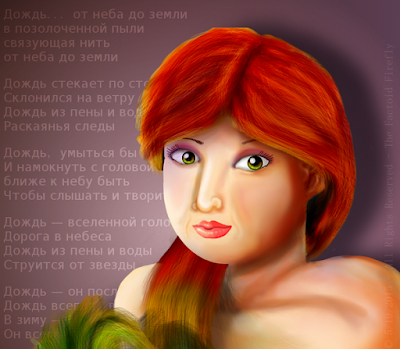
{Digital Art} Origa - Portrait Tribute, May She Rest In Peace.

Well, it's been a while since I attempted a portrait, and well, this time this is more of a tribute...
Origa, to those who don't know who she is, is a singer from Russia, she's best known for singing opening songs in the Ghost in the Shell anime franchise, but she also has her own music...Well, I found out last week that had she passed away a few months ago from lung cancer. Often times I see a famous person died and they were old, so it's sad but in a way expected. In her case it was a bit more surprising as  she was only 44 years old. She had a lovely majestic voice and I highly recommend her different styles of music.

So R.I.P Origa, I hope you are in peace now.
Thank You for your music.


Note: I exported this video twice to fix issues and I forgot to change the name of the song at the end of the video. The name of the Song is Rain by Origa.


The text is the lyrics to one of her songs in Russian. I have put lyrics to a song of a person I'm drawing in the background of their portraits.


May God Bless You, Your Family, The Health OF Yourself, Family, And All That Know You. ~ Amen


~ Firefly


Useful Links:

Want so see more of my art? Visit the Official Factoid Firefly Art Archive Here.
All My Factoids Can Be Found At the Official Blog Archive Here.

Have A Question?
Ask The Firefly!

Tuesday, May 12, 2015

Programs For Artists and Game Creators

Hai! I was thinking that maybe the programs I use and would reccomend to others for making games and graphics might be helpful for others who are aspiring artists and game creators. - Mind you, these are just the ones I have mentioned there are countless programs one can use these are just my select few.

I hope this is helpful to somebody!


Graphics:


GIMP

I do pretty much all my graphics in GIMP, some of them are edited in the program I used for game creation but not overly often. GIMP is an opened-source photo editor and graphic program. This of is as a free photoshop. Granted photoshop might be aimed more towards painting but GIMP is just as good for making game graphics and it's free no strings attached.

MyPaint

As stated GIMP is my main source for graphics, but if I ever make a more advanced game or have a more painted style in mind I will for sure collab MyPaint and GIMP together for better coloring quality. MyPaint is another Opened-Sourced art program, this is more like a free ArtRage, the boldness isn't as sharp as ArtRage but it's still a wonderful program. If you want a more painted look I'd recommend MyPaint for sure; however there is another program called Krita, I can't seem to understand it personally...But I only use a mouse and that's probably why. Can't hurt for you to try.


Inkscape


I don't personally use Inkscape for the simple reason I don't understand Vectoring. When trying to make a vector I get so lost I'm on another planet. That aside, for those who would be more apt to use a vectoring program Inkscape is like a free Adobe Illustrator, it is as well opened source and is powerful enough to make sleek graphics that are vectors instead of normal images that use pixels.


Sounds:


Sony Acid (Free Version)


I use Sony Acid's synth pad to create my sounds (like picking up points, impact noises, power-ups...etc). I don't have the full version so exporting to .wav is an extra feature you can only get if you buy it so I have to use another program to convert to .wav...For what I need it for it's useful. You could maybe use Fruity Loops as well, there's free version if you have no money. Or another alternative is Linux Music Making Studio, it's a lot like Fruity Loops only you don't have to pay for it. (And it works in Windows too)

GoldWave ( Free version)


I use GoldWave to export my sounds in to .wav (that's the format I have to use in my game creation program) and I also edit the sounds in goldwave, like the volume and some effects to the sounds. You can buy GoldWave if you want too, I honestly don't know what you get if you buy it , I've been using the free version for stuff since I'm 10 or 11 years old so...yep. If you want a similar program that's fully free you can get Audacity, it's a free program for editiing music and stuff like that it would 
 probably be just as useful.


Game Creation

GameMaker 8.0


This is a program you'd have to buy for full functionality (unless you learn to code out of the gate). It's a very good program for noobs like me who don't know what they're doing. There's a drag and drop option and a coding option, if you code you have to use it's own coding language. Any previous coding knowlage would probably help you understand the codes in GML (Game Maker Language) however, its it's own lauguage and you'd have to learn it.
GameMaker is currently on the 8.1 version, and if you pay the most money (which is ungodly exspensive) you can make games on nearly every platform there is; however, though, if you are just starting out you don't want to spend all that money if you don't even know if you like the program. I'd mess with the free version first. GameMaker is a primarily 2D based program, there is some 3D ability but not a whole lot.

 If you're more in to 3D you can use J Monkey which uses Java Script as the code but you'd have to also lean how to use Blender which is a legally free opened source 3D animation and modeling program (Think if it as a free Maya).

I wrote review about GameMaker, it's rather old and I have learned a whole lot more about it since then but it might give you an idea. LINK


_____
Program Links:

____


May God Bless You, Your Family, Friend; Along With The Health Of Yourself, Family, Friends, And All Who Know You. ~ Amen


~ Firefly

Useful Links:

Would You Like To Read More Blog Posts Similar To This One? Take A Look At The Official Blog Archive.
Would You Like To See My Drawings? Click here.
Have A Question?
Ask The Firefly!

Wednesday, November 6, 2013

{Digital Art} It's a Good Morning! - Mandisa Portriat!

Reference Image - Copyrights goes to Mandisa
This is Mandisa, she pwns.
She made Simon Apologize.
We Love Mandisa.

Okay lets get to the art......

This is Mandisa, she's a Christian singer but she got her start on American Idol.
I aimed for the same goal as with my TobyMac Portriat, not "realistic" but you can tell it's the person!
This took me a while, and I lost motivation and inspiration but still managed to finish it. I went through editing the sketch a bunch of times but the final sketch is below.

Enjoy!

Programs Used:
  • MyPaint
  • GIMP
  • HyperCam
  • Windows Movie Maker

Bigger Version
Bigger Version


May God Bless You, Your Family, Friend; Along With The Health Of Yourself, Family, Friends, And All Who Know You. ~ Amen


~ Firefly


Useful Links:

Would You Like To Read More Blog Posts Similar To This One? Take A Look At The Official Blog Archive.
Would You Like To See My Drawings? Click here.

Have A Question?
Ask The Firefly!

Wednesday, October 30, 2013

My Current Process in Designing a Character! - Part Two:

This is Part 2 of my blog post about character design!
In this post I'll show you how I've applied some of my tips!

Part One Can Be Found Here!


Lets continue!

Here is my Character Benoni; His name means "Sorrowful".
I picked this name because when he was a younger Scarecrow some sad and traumatic things happened to him and now he's angry and bitter. - I picked first the name "Papa Crow" because he's the oldest scarecrow on the farm he lives on, but then I got more in to designing him and he's better fit as "Benoni" because of his history the name fits better.

Next after some sketches on paper I drew this chart in GIMP:


A few days later I made this "loose" Expressions chart; Then I colored in the chart using MyPaint and GIMP.


See how the chart helped me in the coloring? I forgot to add the stitches around his face, but then I looked at the chart and remembered! Oh wait! I forgot! The coloring also added depth that a chart can't. And, I added symbolism! The Blue buttons represent sadness to go with the name "Sorrow".
And what makes him different from other scarecrows? Well, he's got a hat with 3 different colored leaves, his button eyes have the holes pointing inward to almost make him look cross-eyed and his hay-hair tuft in the middle makes him look a bit unique.

Bigger Version

To be more exploring I tried coloring in another style which is more cartoon like, I think this one looks better even if I like the coloring of the first version!


Here is the 3 styles I tried trying to find the best representation; Non hard-lined, Outlined, and Cartoon. - I've been given the most support for the 3rd, and after a bit of vacation from this character I'm starting to prefer that version as well.

Bigger Version


I've written and extensive history on this Character but I'm not going to get in to it, but his history reflects a bit in his look. I haven't gotten to his body so I'll show another character for that.

Okay, lets meet Paisley the Bengal Tiger!

Her name is to represent her use, she's meant to represent the Middle-East, and Paisleys are common around the Indian areas of Asia, her clothes are inspired from the colors and designs of middle-eastern dress, more namely in South Asia; Her hair also to show the beauty of the fashion of that area, and of course, she's a Bengal tiger! Quite prominent not only on Bangladesh but also in India and other countries in that area.


Notice how I purposly made her have a very fluid pose, and happy expression.
She's instantly likeable! ( I hope!)

Bigger Version

Now look at this figure I drew a few years ago, she's a dancer so she should be very "curvy" in her figure because of the occupation and pose of her body. - But instead, she's kinda tense looking.

Bigger Version


So in the end for my method we have to:


  1. Brainstorm And Create!
  2. Name The Character!
  3. Give the Character a Personality!
  4. Draw out Emotions!
  5. Get a method to help redraw the characters!
  6. Color! 
  7. Keep Figures Fluid and Alive!


I hope these posts were helpful! Feel free to ask questions if I didn't make something clear.

Now get out there and design a character!


May God Bless You, Your Family, Friend; Along With The Health Of Yourself, Family, Friends, And All Who Know You. ~ Amen


~ Firefly


Useful Links:

Would You Like To Read More Blog Posts Similar To This One? Take A Look At The Official Blog Archive.
Would You Like To See My Drawings? Click here.

Have A Question?
Ask The Firefly!

My Current Process in Designing a Character! - Part One:

My Current Process in Designing a Character! - Part One:


In Tip of the Week 2 I said design a new Character! I myself struggle making a character and also look for that perfect instruction guide in teaching me the magic zen of the perfect Character, and although I haven't found THE ONE! I have found some commonly said tips and thought I'd share with you some of those tips along with what I've come up with so far in my own method.

My Method:


Step 1: Brainstorm! If you don't already have a character in mind (from a story in your mind or such) you can do and exercise that Children's Comicbook Writer and artist Dave McDonald does and draw a random shape then give yourself 15-30seconds and draw a character. It's not to be a perfect character, just to give you an idea. If you're in to more detailed styled art and 30 seconds isn't enough for a full character just start with the face. You don't have to like everything you do, it's just to give you some ideas where to start!


Step 2 and 3: I put these together because depending on who you are you might want to interchange these steps.

  • 2: Name your character. -Some people wish to give their characters names based off of their personality or life story. Like,you might have a Character that has to heal from a tramaic event and name them "Raphael" Which means " (the)God who heals". Or Maybe a a girl with a bitter past you might name her "Mara" which means bitter sea. 

  • 3: Give your character a personality, what do they like? what do they not like? Are they a he or she? Do they have an agenda? Many other questions you can ask, depending on the reasoning for the Character you might want to write an actual chart that looks something like this:

__________________________________________________________________
Name: Kole Shimska
Age: 28
Likes: Ice-cream, sleeping, books, sleeping with books, cats, and her pet hamster Dimitri Jose.
Dislikes: People who tease her glasses, singing in public, being active, being late.

Life Story: Kole is from  Moscow Russia but lives in Columbia, she grew up without glasses but had an accident that makes her need glasses when she was 15. Kole Graduated from University when she was 20 and has an above average IQ and often annoys her one and only friend with saying random facts. She's often sad and lonely books and her hamster acting as her friends, since her only real friend lives far away and she can't always see him.
__________________________________________________________________
This isn't an actual character of mine, just an example of what you can do!

You could even add her hair, skin and eye color in the profile just to keep organized if you like!
Or if you want to get super super specific, write down the color codes/names to your colored pencils or markers (or other media) so you can exactly recolor your character over and over again. If you use digital you might want to make a color swatch and put the code number in it for double security (although the color select tool in your preferred program should find the color for you. )


Step 4: Play with expressions, even if you have an always happy or always sad character, we all know life isn't always in one state mind forever. And you get to know your characters better when you see how they look sad or happy or a bit tiffed about something! I'd say do the main 4 Expressions to start but surly do as many as you want!

The Main 4 would be:

  • Happy
  • Sad
  • Angry
  • Shocked
Each of these have level of emotion, one can be sad because they lost a game but won't cry about it, and another can be sad because their cat was stolen and cry their eyes out! Or one can be a bit irritated they lost the game but super angry when they cat was stolen! And so on it goes...I think you get the point! - If you want to add a 5th I'd say "shy" would fit, but it depends on your view of life and stuff so, just have fun making different expressions!

Once you've done that, keep a polished chart of your character's expressions so you can duplicate it a bit easier!

Also remember That the human body also has a lot of expression; A couple in love as they look at each-other's eyes appear soft, vulnerable, happy and relaxed, an angry person is quite tense and holds stuff down or is exploding in much action, a sad person is a bit saggy in bodily expression and etc etc etc!

Step 5: That oh so painful reality, I have an epic character, perfect name and personality...But, oh no! I can't draw the same character two times! What do I do?

Get a System:

Well, I myself haven't mastered the perfect method for this but in my "research" over the past few weeks, I came across a tip from an up and coming artist that said to make a system of in what order do you draw the character; Do you draw the eyes, nose, then mouth? Or...Head shape then face? Or, do you draw whole body and leave the details of the head and face for last? Get a system! It's a bit hard for me since I go where I want as I draw but if you got the discipline this could be pretty helpful! And even if you don't, spite yourself and try it anyway, do you wanna be comfortably not as could as you could be or work and be better?! Go moving solider! We got work to do!

Create a Chart:

One thing I have done is create a chart of the sketch, this could be done best on the computer in my opinion so you don't scuff up the original sketch. Say what makes this character unique, what stands out about him/her/it, and keep the chart as a reference!

Here's an Example:

Bigger Version

 See how it explains the ins and outs of this character's face! It even has a few notes on the bottom to remind me of things that explain why he's this way. - A chart might help you too! And do it with the body as well, note the shape, how tall using the head as a measurement, maybe even measure with a ruler and say how big each thing is to  make it perfectly exact!

Step 6: Color! Color! Color! 
Even if you don't color well or have "good" materials, that's fine! The Majority of my art supplies are children's pencils and markers. Coloring a character adds a new dimension! There is much color symbolism in the world, and you can create your own symbolism! For example: Red can mean evil or energetic, blue can mean calm and collected or sad or loneliness, yellow can mean cheerful and on and on it goes! How you look at color might and probably is a bit different than mine, just have fun with it! Play with patterns, play with designs, it doesn't have to look like a pro it just has to be fun! If you're not having fun with it and you're not being payed/have to do it you shouldn't do it! Have fun!
Aim to be the best but don't give up just because you're not there yet! You think Micheal Angelo got there over night? If he did I want his coffee cause that boy got it right!  Even the best were bad at one point it's fine, just keep going, aiming, having fun!

Even if you want to work in black and white, I think having 1 solid either very best you can do image, or a chart could help you immensely.


Step 7: Keep Figures looking flexible and alive!
Maybe you want to draw cartoons that are simple, or very extravagant figures but still, to make them look lively a good figure structure is essential! I don't suggest to go buy books, find a model to pose w/o clothes on or anything of the sort, there are pleanty of charts on the internet that are "clean" and have lots of tips.
 

 This one being an example: Majnouna's Tutorials
From what I've seen these are perfectly clean but teach a lot, if there is something "questionable" let me know I'll take the link down.

My main tip is keep the figures fun and "friendly" that doesn't mean never draw a villain but make them look "human"!  Of course the imagination does stop at people or animals, once you get in to your own space Anatomy is up for grabs and making something/someone "anatomically" correct isn't needed at that point.

That's the End of Part One, Part Two will deal with my Character that I designed a bit and show you some of how I've applied these things to my own drawings. - Can be found here.

Useful Links:

Would You Like To Read More Blog Posts Similar To This One? Take A Look At The Official Blog Archive.
Would You Like To See My Drawings? Click here.

Have A Question?
Ask The Firefly!


Wednesday, October 9, 2013

All My Uploaded Time Lapse Videos So Far!

These are all my time lapse videos I have uploaded so far, I just figured I'd share with all yous!


May God Bless You, Your Family, Friend; Along With The Health Of Yourself, Family, Friends, And All Who Know You. ~ Amen


~ Firefly


Useful Links:
Would You Like To See More Of My Drawings? Click here.
Would You Like To Read My Blog Posts? Take A Look At The Official Blog Archive.


Have A Question?
Ask The Firefly!

Wednesday, October 2, 2013

{Digital Art} Speak Life; TobyMac Portriat

This is my first portrait of a celebrity and my first art project being 18! wooo yay me!
Sketch One - Bigger Version
This is TobyMac, he's a Christian singer (pop hiphop stuff) more famous among us kids, hah!
Sketch 2 (Edit) - Bigger Version
But anyways I've only done one other portrait, it was of a lady's daughter and I didn't post to keep the confidence. I'm new to this kinda thing and coping people and photo references are my worst nightmare. I'm wasn't going for full realism or anything but I did want it to look like him!
I guess you'd say I wanted capture his essence. I was going to outline him in the end but I forgot so...oops! L0L


Anyways...Enjoy!


Bigger Version


Bigger Version

Programs used:


  • MyPaint
  • GIMP
  • HyperCam
  • Windows Movie Maker


Photo Reference


My video of this is going to be a little odd, I put the sketch in the wrong spot in the middle of the video, but it took so long to export that I didn't want to wait until tomorrow to upload it so I stuck with this version. - It also skips a lot of stuff, the laptop I use to draw on was getting laggy with MyPaint, GIMP, HyperCam and  Media player all at once so I turned HyperCam off.


May God Bless You, Your Family, Friend; Along With The Health Of Yourself, Family, Friends, And All Who Know You. ~ Amen


~ Firefly


Useful Links:
Would You Like To See More Of My Drawings? Click here.
Would You Like To Read My Blog Posts? Take A Look At The Official Blog Archive.

Tuesday, October 1, 2013

New Download: How to Paint an Eye (Iris) with MyPaint and GIMP - PDF

New Download: How to Paint an Eye (Iris) with MyPaint and GIMP - PDF

 
How to paint and eye (iris) using MyPaint and GIMP.
I think you could do all the steps in GIMP just ignore the special brushes and do it in GIMP purely. This is my style not a specific style like "Anime" or "Realism" I do this or variations of this with all my types of drawings. 
 
I was a bit distracted and I had to kinda "tape" this back together since the original document wasn't working right I had to paste this back together in a new document! So if something is confusing feel free to ask. 

I hope this is helpful for somebody!
 
Download Here
 
12 Pages with Step by Step Instructions, Full Color Pictures to help you see what you are learning.
Redistribution allowed if I'm given full credit. - MyPaint and GIMP are used to draw one iris not one eye for each program.

Enjoy!


May God Bless You, Your Family, Friend; Along With The Health Of Yourself, Family, Friends, And All Who Know You. ~ Amen


~ Firefly


Useful Links:

Would You Like To See All The Downloads I Have To Offer? Click Following Link For The Official Downloads Page
Would You Like To See My Drawings? Click here.

Have A Question?
Ask The Firefly!


Tuesday, August 27, 2013

Digital VS Traditional - Is one "better"?

Digital VS Traditional - Is one "better"?

I've heard there is a semi silent war between digital art vs traditional art, if this is the case I'd like to play diplomat and set at ease those who don't know which is “better”.

Basics:

Let me just say out of the gate, art is art, everything takes learning unless you're a super brain with no need for practice you just look at a painting or digital drawing and can duplicate it (which there are some gifted people like that.) there is no “right type” of media, although in this day and age if you want a job in art design for lets say for example Disney they expect you to be able to do digital or at least have a little bit of knowledge in that area, whether you are good at traditional or not.
 
I'd like to tell what the difference is for those who are just starting or aren't quiet sure what the real difference is between “Traditional” and “Digital”:
The difference is pretty simple; digital is drawn or rendered on the computer in a program, while traditional is done purely with media that's not digital like, paints, paper, art boards pencils and the like, each is different and within the 2 dimensions there could even be sub wars on “which media is best?" within their own rights, paint and markers can fight, and 3D Blender vs 2D Synfig can duke it out;  Just keep this in mind : Art is art.


My view on Digital VS Traditional:

One of my Images Drawn in MyPaint and GIMP
Digital art in my opinion, even in all it's glorious beauty will never be able to fully duplicate the exact charm that traditional art has, I'm not saying it can't duplicate traditional art, programs like MyPaint and ArtRage go out of their way to duplicate and they do pretty well, but there is something about getting paint on your hands, marker ink on your fingers an feeling the texture of the paper that has a close feel to it, and a warmth that can't be duplicated by the “fake” paints, markers and pencils the computer generates. - Again I don't say it's not beautiful, or it's bad, I love to draw with MyPaint and GIMP but it's just not the same.

Traditional Drawing From Me

Some people might think when it comes to things like paint and pencils“that's old stuff” but without old we wouldn't have the new. Without the first artist, whoever that might have been, we would never have the newest internet sensations of artists, without Disney we wouldn't have Anime, Pixar, Dreamworks, or any other animation, without Papyrus scrolls we wouldn't have modern paper, the list goes on with this but I believe the point is made, for something to be new, you have to have something old.

Then we have the people who don't like anything new, now granted there are some new things where it's just a bad idea, no arguing it, it's bad! But what about things like Anime? There are art teachers that will practically forbid their students to draw it because “it isn't art” it's just that “new” stuff that kids watch these days...Whether you like Anime or not (I'm in the middle on this), you cannot argue that it's not a talent to be able to draw and story tell like the Japanese do; And it's not even new, it's just newer to the western world, if you told a Japanese person that Anime is new they'd “roflol” at you in total belittling humor. 

Digital gives the image of perfection, Traditional can give that perfection image but also a “down to earth” feel.

Brief Digital View:

Some people see digital art or computer 3D rendering as cheating, “you just have a program do it for you”; Believe me, although even I feel to a point there is a bit of “cheating” involved, I know that it takes a lot of work to make a 3D or even a 2 drawn movie or drawing using computers.

Look at this Screen Shot of the Default user interface of Blender a free 3D rendering program.

Bigger Version Here.


This is just a free program! Imagine what the high class programs Pixar or Dreamworks uses, it's ridicules! There is no way a person can say that 3D rendering is simple or literal cheating is going on and fully believe it, you can feel it but doesn't mean it's true! ( I apply this to myself as well.)

Here's also another Screen Shot, this is of my setup in GIMP 2.8.


Bigger Version Here.

It's got a lot of features, if I was to go in to all the filters, brushes and things within GIMP I'd be doing a GIMP overview and for now that isn't my purpose; With that said, it's taken me years to learn GIMP and I'm still learning.

Traditional View

Okay, I'll be honest and you've probably felt the vibe throughout this, I love traditional art, I find it the life’s blood of all drawing, animation, and visual art in general, I just love it. So am I a bit biased? Eh, maybe, but I'll be honest!

Traditional art has so many realms it's not even funny, we have pencils, we have markers, we have pens, we have paints then we go down in to types of the formerly mentioned: Oil paints, watercolor paints, washable markers, permanent markers, fine art markers, lists galore everywhere!!

If a person can master one of these mediums it could be a life's mission, and the same counts for any other media whether it be 3D rendering or digital painting.

Traditional is for me, more impressive, for others maybe not so much but for me, if you can draw something that you wanna touch with colored pencils or markers, I'm just passing out with my mouth wide opened “WOW!”. Traditional can tend to not be “perfect” which reminds us a human made the picture.

Traditional might cost more money in the long run, but if you enjoy doing it it's totally worth it!


Combining the two:

Screen Shot From The "Be Our Guest" Scene
Okay, most of you probably saw Disney's “Beauty and the Beast”, it's one of their classic hand drawn princess movies, but what you might not know is that for the “Be Our Guest” song scene there was computer generation added to it; The part with the chandelier was CG generated, but it all looked like their lovely hand-drawn animation, it had harmony and beauty, and it probably made it much easier for the animators. 

 
Another Screen Shot From The "Be Our Guest" Scene

Screen Shot of "Doctor Doppler"in Treasure planet
Another Disney treasure, “Treasure Planet” had hand-drawn and digital combined and it was wonderful! Some people weren't fond of the style but I think they did a good job personally. Everyone is entitled to their own opinion. But my point is, that in the world out there where the pros are, they combine the two and it comes out great. One isn't necessary better than the other, they're different but still the same.
Screen Shot of James Hawkins looking upon a CG Generated Space Whale.
 Note: All Rights Reserved to Disney on the Artwork expressed in these images.


Just a thought: If you can't draw anything on paper what makes you think a computer is gonna help you? Sure there are tools that could make it simpler but you still have to learn to draw, whether on paper or on the computer you have to learn.

These 2 medium compliment each-other: Drawing on paper helps drawing digitally, and drawing or rendering digitally helps you to see how three-dimensional objects work in a new light and make things that you can't make on paper or canvas. There are things that can't be done with one medium that the other can do: Blender can't paint on a canvas with oil paints and a marker can't make a 3D Rendered image of Woody Pride (Toy Story) or Vanellope Von Schweetz (Wreck it Ralph) but we can learn from both, and make them be in harmony so why don't we just have fun?

Maybe you want to draw a picture but you find it hard to sketch on the computer, sketch on paper! Maybe you find inking hard with pens, scan (if you have a scanner) a sketch use tools on the computer and print it out, if you don't have a scanner use a camera if you have one!..Or maybe you can't color too well on paper, use a program to color your drawings you've inked or sketched, there are tools available to you! And to those who think they can't because they don't have a tablet, trust me on this, you don't need one, yes it's good if you have one but you don't need it, I know of artists including myself that use a mouse and things come out just fine!


In conclusion:

Just as many people make beautiful things with colored pencils, markers, and paints as people who make paintings in Photoshop, Paint tool Sai, MyPaint or other programs, there's a harmony.
I do both, I do more “realistic” stuff with the computer and do more cartoonish on paper, I have my own balance, I don't say one is necessarily better than the other because I love both. Even the professionals use both, there isn't one all powerful art medium!

And also don't forget, style is key, if you are aiming for a certain style you need to use certain tools, if you wanna recreate Shrek you need to use a 3D rendering program, if you wanna recreate the Monalisa you need paint (unless you wanna recreate digitally which is an option), all in all, find yourself, find what you love, nothing is “the thing” you need, you need what you love to use an are most comfortable with.

So with all this I say, make up and hug it's all supposed to be fun, so have fun!


May God Bless You, Your Family, Friend; Along With The Health Of Yourself, Family, Friends, And All Who Know You. ~ Amen

~ Firefly


Useful Links:

Would You Like To Read More Blog Posts Similar To This One? Take A Look At The Official Blog Archive.
Would You Like To See My Drawings? Click here.

Have A Question?