Moko-Young's Factoid Firefly album on Photobucket
Showing posts with label Game. Show all posts

Monday, January 26, 2015

{ Game Release } Flufffertini's Pizza Constructor

This has been my secret project for the past week or so! Took a lot of work and brain-draining but I finally got it! This is my first Drag and Drop game ever! Comments are welcomed.

Also note that I am a windows user and don't know how this will work in non-windows OS systems.


_____

 Introducing....


Download


Note:
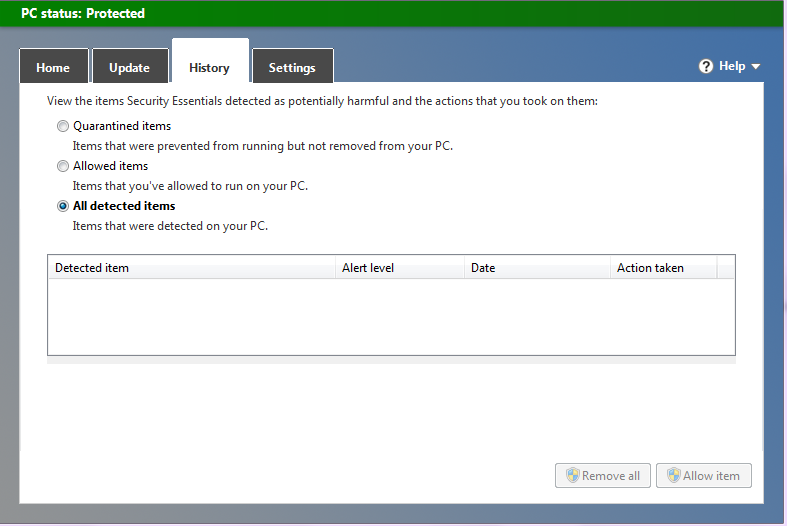
Due to my host being a private domain (borrowed space) you might get a notice saying this is a virus. This is because the server isn't a "known" source to downloads therefore considered unsafe. I have this screenshot showing I scanned it saying it's safe!


© 1/2015 - All Rights Reserved, The Factoid Firefly [Game]
© All Rights Reserved, Jason Shaw, Audionautix [Music]


Programs Used:


  • GIMP – Graphics
  • Goldwave – Conversion of Music to a .wav file.
  • Sony Acid – Sounds
  • Gamemaker – Game Construction; Image Editing
  • Calculator – Coordinates


Creator's Notes:

Features:


  • Drag and Drop Capability
  • 3 Bases to Choose From
  • 21 Topping Selection + Index
  • Delete-able Toppings Once Put On The Pizza Base.
  • Easy to Navigate Menus


Annoyances/Bugs:


  • Sometimes if you move the mouse as you are releasing the left mouse-button (dropping an object) the object does not fall but still follows the mouse. This can be remedied by clicking again. - This is more likely if you are using a touch-pad but it also happens with a normal mouse.


  • Not often, but sometimes a topping starts glowing after you drop it. This has only happened a few times while I was developing so it shouldn't cause you any trouble and it's not harmful you can just delete the dropped topping using right click.


  • If an object is too close to another (that has been dropped) and you go to move them again, they might overlap. Once overlapped you cannot pull them apart because though the image looks like a certain shape it's really on a square that is almost identical in size for a background; Because of this, if you click on one object it sees both as one. Just delete them and start over if you don't like how it looks. - This principle applies also to deleting.

  • Though images look on top of each-other when you are dragging and object they will always go on top. I don't think there is a way to prevent this.


  • For some reason the images look under the dropped images but when dropped it goes on top.


_____


May God Bless You, Your Family, Friend; Along With The Health Of Yourself, Family, Friends, And All Who Know You. ~ Amen


~ Firefly
Useful Links:
Would You Like To See More Of My Drawings? Click here.
Would You Like To Read My Blog Posts? Take A Look At The Official Blog Archive.
Have A Question?
Ask The Firefly!

Wednesday, March 12, 2014

Some Power-Up Updates to Tilly's Rose Garden

Here's a video of some things from my other game I'm working in, Tilly's Rose Garden.


May God Bless You, Your Family, Friend; Along With The Health Of Yourself, Family, Friends, And All Who Know You. ~ Amen


~ Firefly
 

Useful Links:

Would You Like To Read More Blog Posts Similar To This One? Take A Look At The Official Blog Archive.

Would You Like To See My Drawings? Click here.


Have A Question?
Ask The Firefly!

{Offcial Announcement} The Factoid Firefly's First Drawing Tutorial Program

Offcial Announcement} The Factoid Firefly's First Drawing Tutorial Program


I unofficially announced that the Factoid Firefly has a new "game" in the works in This Post, well now it's an official announcement that "Drawing with Factoid" is in the works!

In this program which will be made in GameMaker you will be able to pick out different drawings to learn how to draw and you will be taken at your own pace, step by step until the end with factoid as your guide. It will be made only in English, but after I finish it I may consider making a Spanish version (wish Translation help).


Here's A Short Video Preview:


I hope you all keep on coming!


May God Bless You, Your Family, Friend; Along With The Health Of Yourself, Family, Friends, And All Who Know You. ~ Amen


~ Firefly
Useful Links:
Would You Like To Read More Blog Posts Similar To This One? Take A Look At The Official Blog Archive.
Would You Like To See My Drawings? Click here.
Have A Question?
Ask The Firefly!

Tuesday, December 10, 2013

Game Release - Tilly's Rose Garden, New Version! [Still in development!]

Tilly's Rose Garden!


Introducing a brand new game! 

Fun for all ages, “Tilly's Rose Garden” is an enjoyable overhead 2D platform game, similar to pac man in game play, lovely graphics all made in GIMP 2.8 and sounds made in Sony Acid (Demo version). This game is fun for all (even if it is a bit girly!).

Enjoy picking the flowers and avoiding point drainers and enemies, both moving and idle!

Note: This is still in development so there are still bugs and inconveniences!


Trailer:

Creator's Notes:

Edit: I noticed that the menu has a typo! That will be fixed next version.
  • Things seem to stick a bit because of the grid and transparency, if your player won't move in to each area smoothly try and lightly tap the movement key you are trying to use, if you don't budge at all then try to go another way, it's a bug I'm trying to see how to fix, but I think it's always going to do that because of the images it gets stuck on.
  • If you push on moving blocks they'll go out of alignment be sure not to do that!
     
  • I haven't been able to get the cursor to windows to go away even with "Display Cursor" unchecked, I'll figure out how to fix this eventually! - And to add to this, I'm still yet to learn how to make the cursor only appear in menus.

  • This Edition of "Tilly's Rose Garden" has no music, I might change this within the next fixed up version but for now it just has basic sounds.
  • All artwork is created in GIMP and all sounds are made in Sony Acid (Free Version).
  • To see how many points you have, you have to play in window mode, or full screen; If you press "f4" you will play in a total full screen (No user bar on the bottom or start menu will be visable) and can't see the points. - The points are visable on the upper left hand corner of the window border of the program.
  • Saved Games go in to a .sav file, be sure not to delete that when you see it, that's where your saved game is!
  • Going in the diagonal directions can cause the player to go out of alignment although not always, just a warning!


Copyright:

© 12/2013 - All Rights Reserved to Mokonafan/The Factoid Firefly, All Reproductions of This Game Without Previous Permission is Expressly Prohibided.

Permissions:

  1. Linking to my game - Yes
  2. If already downloaded, giving to a friend - Yes, but I'd rather you link them.
  3. Selling it - No
  4. Claiming it as your own - No
  5. Modifying or changing, no matter how extreamly unrecognizable in the end - No!


If you download, please give me a comment, good or bad, just please, if you have consturctive critique say it nicely, don't say I'm stupid or anything like that (people do things like that!).

May God Bless You, Your Family, Friends; Along with the health of you, your family and all who know you. ~ Amen


~ Firefly


Useful Links:


Would You Like To See All The Downloads I Have To Offer? Click Following Link For The Official Downloads Page
 Would You Like To Read My Blog Posts? Take A Look At The Official Blog Archive.
Would You Like To See My Drawings? Click here.


Have A Question?


Monday, November 25, 2013

Edit: OLD DEMO - Tilly's Rose Garden [DEMO!]

This is a demo of a game I'm working on (Not promising a finish!), for now the object is to get all of the flowers then go to the circle to get to the next level! But don't touch the scarecrows or you'll have to pick them up all over again!


Creator's Notes:
The things are sensitive to touch in this game, if you touch the circle or scarecrows at all the level will be stopped and he next action will happen (restart or next level).

The player gets stuck on the mazes when it's a tight fit, I'm not sure why but I think it's how the program's room-grid works.

The "X" button to close the program for some reason doesn't work, use Escape (Esc) to close.

The Game Goes in to full screen mode and it's size adjustable  if you wish to make it bigger.

You can go to the next level whenever you want, you'll just not get all the points if you don't pick them up.


How To play:
You use the arrow keys for movement, the name of the key it the direction you go (up = up etc.)


Download Here


Programs Used:
GIMP - Art
Sony Acid (Free Version) - Sounds
Gamemaker 8.0 lite (Free Version of Gamemaker) - Putting it together and making it playable.


Enjoy!

Comments on what you think, how it could be improved, or other like bugs or the like are all welcomed!

May God Bless You, Your Family, Friend; Along With The Health Of Yourself, Family, Friends, And All Who Know You. ~ Amen


~ Firefly


Useful Links:
Would You Like To See More Of My Drawings? Click here.
Would You Like To Read My Blog Posts? Take A Look At The Official Blog Archive.


Have A Question?
Ask The Firefly!