Program Review 3; Game Maker - Is it good for aspiring game designers?
Helllllloooooo! It's been a while since I did a program review, in
fact the last one I did I was told by somebody to take it down
because it wouldn't be good to keep here, but I kept it anyway and
bless God I've gotten the most comments on THAT post I was told to
take down!
Okay so...This post will be about Game Maker! Now, you know I'm all for free programs, but this one is a special
case. Although you do pay for the “Pro Version”, there is a “lite”
version that you can still do a nice game with although not as fancy
as for free.
What is Game Maker?
Game maker is a 2D focused game making program, it can make games
similar to PacMan, Super Mario, and RPG games like the Pokemon games;
It does support 3D but it's not focused on that so from what I have
read it's not too wonderful in that regard but if it's available, why
not give it a try too!
Game maker works in both Mac and Windows OS.
{For a more 3D focused game creation program, you could use
Jmonkey, this is a full out engine that requires using Blender and
Java Script and I believe it supports Opened GL. - Jmonkey Website
Here.
Or you could try the UDK game engine, it's a a sample of sorts,
you can create indie games with it. It's the engine to the “Unreal”
games were made with. That Engine can be found
Here.
Note: I haven't used UDK and only attempted
Jmonkey briefly I have no comment other than they are available for
use if you want to do more 3D games instead of platform games.}
What Functions Does It Have?
Game maker has many functions and sub functions, although I'm
still new to this program (only about 2 weeks playing with it) I've
learned enough to give you a breif tour, so...Here I go!
Note: This is Gamemaker 8.0 not 8.1 I'm not sure of differences from the two versions but I can imagine it's mostly bug fixes or something of that nature.
There are 9 basic functions with many sub functions within Game
Maker, here is a screen shot from Game Maker itself so you can see!
Here are screenshots for other interfaces within the program:
Basic Main Interface:
Sprite Editor and Creator:
You can either import an already made sprite or make a sprite in Game Maker itself.
Room Creator:
This is a point and click feature for making rooms/levels for your game, this is where you put it all together. You can watch a video on me making a room in this interface
here.
Object Creation Interface:
In this part you "program" what you want things to do, by either already set options or by setting it up with scripts.
The Scripting Interface:
This is where you write scripts for Game Maker, to get to the script interface you have to have advanced mode on and there will be a folder on the side bar called scripts, right click on it and create a new script.
How Does Game Maker Render Game Creations?
There are 2 ways that I know of to create games in this program:
Drag and drop, and GML – Game Maker Language (scripting), then you
put the whole thing together in the “Create a Room” option; I am
newer to the program so I use the “drag and drop” option and
don't know about scripting yet, but if you want to read about the
scripting aspect you can go to it's Wiki Page
Here;
I'll talk briefly about the “Drag and Drop”.
Note:
Wiki Pages Related to
Game Maker are often butchered and not fully accurate if you want the
best information go to the yoyo games forums to ask actual users, and
makers of the program. - Forum can be found here.
Drag and Drop:
In game maker you do 2 steps with mini steps after
and it would go as follows:
1:
You Make a Sprite (A Sprite is an image and can be
animated)
2: You Make an Object; Within making an
object you do some mini steps after within the object itself, for
example: Lets say you want a your character to stop at a block you
create your sprites and make both sprites (the wall and the player)
in to objects, then you go in to the players object and make a new event
called collision and within that you tell it to move at a speed of 0
within the directional move option. Basically you tell it what to do in pre-made steps
that you arrange and can somewhat customize.
Note: You don't always need a sprite, things like music and a score board for example are objects with out sprites.
You can also use scripts and drag and drop, and make
invisible objects that create things like a health bar and lives, and
many more things that I haven't played with as of yet!
Is this program good enough for a stand alone or
do I need other programs?
Graphics:
It's really up to you, I personally am a very visual
person, I want to see what I like and like what I see and for that I
pair up with GIMP for the graphics, if I was making a more complex
game like a Super Mario World type game I'd go with GIMP paired up
with MyPaint, but that's my preference! Whatever you feel
comfortable, even MS Paint isn't that bad, if you want to make Pixel Art MS paint is perfect! If you are a linux user Tux Paint might be
perfect for you!
If you want my own personal opinion I think this
program is best paired up with another program like GIMP, MyPaint or
Inkscape (if you want to go with
buy-able programs then Photoshop, Illustrator, Art Rage or other
programs), it has a “drawing” tool within the sprite maker
and it's not bad! But if you want the best looking graphics,
especially for a 2D game I think a more professional program would be
better, but that's up to you!
Sounds and Music:
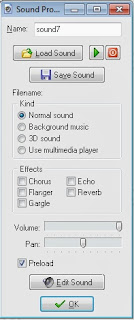 Yes you will need another program for this because you can't create sounds only import, unless
you want to go with the provided default things that Game Maker provides you will need to either use another program or have a friend/person make the music for you. - I personally use the free version of Sony Acid for sounds I
haven't composed any music as of yet so for that I have no personal
usage recommendations, just remember any music you might add it would
be the best for all involved if you make it yourself for copyright reasons.
Programs that are good for music composition would
be Sony Acid or Fruity Loops (I have the “Demo” versions of both,
they are limited but still semi useful), there are also other
programs, like Rose Garden, Audacity, Goldwave and many others. - A
full list of programs can be found here.
Yes you will need another program for this because you can't create sounds only import, unless
you want to go with the provided default things that Game Maker provides you will need to either use another program or have a friend/person make the music for you. - I personally use the free version of Sony Acid for sounds I
haven't composed any music as of yet so for that I have no personal
usage recommendations, just remember any music you might add it would
be the best for all involved if you make it yourself for copyright reasons.
Programs that are good for music composition would
be Sony Acid or Fruity Loops (I have the “Demo” versions of both,
they are limited but still semi useful), there are also other
programs, like Rose Garden, Audacity, Goldwave and many others. - A
full list of programs can be found here.
Price:
The price can only (from what I can tell) be said for 8.1 which I do not have, but the price is $39.99 for windows and $19.99 for Mac for the standard GameMaker, for Pro it's $99.99.
The Free Version can be found here (Legally).
Free Download
Conclusion:
I think Game Maker is pretty beginner friendly! There are a fair amount of videos on YouTube for things, along with tutorials on the Game Maker Forum.

I give it 5 stars for beginner friendliness , but it looses half a star because they make you pay I believe too much for the program when you buy it.

I hope this was useful for you who are interested in the program!
Links:
Game Maker Download
Game Maker Forum
100 Game Maker Games in 10 Minutes (Video - Not Mine!)
May
God Bless You, Your Family, Friend; Along With The Health Of
Yourself, Family, Friends, And All Who Know You. ~ Amen
~ Firefly
Useful Links:
Would You Like To Read More
Blog Posts Similar To This One? Take A Look At The Official Blog
Archive.
Would You Like To See My
Drawings? Click here.
Have A Question?
Ask
The Firefly!